How to Find EPIC Number in Voter ID: Complete Guide for Voting
You're about to apply for a personal loan on PaisaOne. The application asks for identity proof. You have your voter ID, but you're not sure where the EPIC number is. Or maybe you've lost the physical card and need to verify it online.
Your EPIC number serves a dual purpose: it identifies you as a registered voter AND works as valid KYC documentation for loans, credit cards, and bank accounts. Finding it is simpler than you think—whether you have the physical card or not.
What Is an EPIC Number? (Quick Definition)
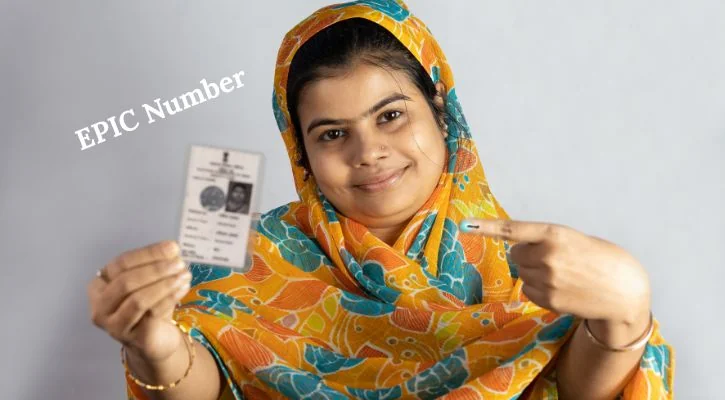
EPIC stands for Electors Photo Identity Card. It's a 10-digit alphanumeric code (letters + numbers) issued by the Election Commission of India to uniquely identify registered voters.
Think of it this way:
- Voter ID = The physical card (or digital document)
- EPIC Number = The 10-digit code on that card that identifies you
For example: AB12CD3456
Why it matters:
- For voting: You need it to cast votes in elections
- For financial services: Banks and lenders use EPIC as valid KYC (Know Your Customer) documentation for loan approvals, credit cards, and account opening
- For government services: Required for various government-related verifications
Where Is the EPIC Number on Your Voter ID Card?
The location depends on which version of voter ID you have:
Old Laminated Voter ID Cards
- EPIC number printed on the front side
- Usually at the top, above or beside your photo
- Bold alphanumeric characters
- 10 digits total
New PVC Voter ID Cards
- EPIC number printed on the front side
- Within the personal details section (more standardized)
- Same 10-digit format
- Easier to read than old cards
Digital e-EPIC (PDF Version)
- Available if you've downloaded your digital voter ID
- Appears on the first page near your name and personal details
- Easily searchable in the PDF
Quick check: If you have your physical card, look at the front side. The EPIC number is prominently displayed—you can't miss it. It's bold, alphanumeric, and 10 digits long.
How to Find EPIC Number If You Have the Physical Card
Step 1: Hold your voter ID card with the front side facing you
Step 2: Look at the top section, above or beside your photo
Step 3: You'll see a 10-digit code combining letters and numbers
Step 4: That's your EPIC number (example: AB12CD3456)
What if you can't find it?
- If the card is faded/damaged, use the online method below
- If the card is completely illegible, download digital e-EPIC
How to Find EPIC Number Online (Without Physical Card)
You don't need the physical card. Three methods below:
Method 1: National Voters Service Portal (NVSP) - Most Common
Step 1: Go to nvsp.in or voterportal.eci.gov.in
Step 2: Click on "Search Your Name in Voter List"
Step 3: Select one of these options:
- "Search by Details" (if you know your personal info)
- "Search by Mobile Number" (if you want SMS-based search)
Step 4: If using "Search by Details," fill in:
- Your full name
- Date of birth
- Father's/Husband's name
- Gender
- Select your state and district
Step 5: Complete the CAPTCHA (security verification)
Step 6: Click "Search"
Step 7: Your EPIC number appears on the results page
This method usually takes 5-10 minutes.
Method 2: If You Already Know Your EPIC, Verify It
Step 1: On NVSP portal, select "Search by EPIC"
Step 2: Enter your EPIC number (10 digits)
Step 3: Select your state
Step 4: Click "Search"
Step 5: System confirms if EPIC is valid and displays your details
This method is fastest (under 2 minutes).
Method 3: Download Digital e-EPIC (Most Secure)
Step 1: On NVSP portal, log in with your registered mobile number
Step 2: Click "Download e-EPIC"
Step 3: You'll get a PDF file of your digital voter ID
Step 4: Open the PDF and look at the first page
Step 5: Your EPIC number is clearly shown near your name
Digital e-EPIC is particularly useful because:
- It's always available (no physical card needed)
- You can easily email or upload it for financial services
- It's RBI-approved for KYC purposes
Read More: How Much CIBIL Score Required for Personal Loan
Understanding EPIC Number Format
Your EPIC number consists of 10 digits: 2 letters + 8 numbers
Example breakdown: AB12CD3456
- AB = Your state code (varies by state: AB, EE, RJ, etc.)
- 12CD3456 = Sequential identification number within your state
This structure ensures every EPIC number in India is unique. The state code tells you which state issued your voter ID, and the sequential numbers identify you uniquely within that state.
Why EPIC Number Matters: Beyond Just Voting
Electoral Purpose
- Required to cast votes in municipal, state, and national elections
Financial Services (Critical for PaisaOne Users)
- Valid KYC for banks: Opening bank accounts
- Loan applications: Personal loans, home loans, education loans
- Credit card applications: Using voter ID as identity proof
- RBI-approved: Reserve Bank of India recognizes voter ID with EPIC as official identity documentation
Other Uses
- Passport applications
- Government service verifications
- Electoral roll verification
- Census and survey documentation
For financial services specifically: Your EPIC number + voter ID serves the same KYC purpose as Aadhaar or PAN. Banks and fintech platforms (like PaisaOne) accept it equally.
Using EPIC Number for Loan & Credit Card Applications
Before You Apply on PaisaOne:
Step 1: Verify Your EPIC Number
- Confirm it's readable on your card or download e-EPIC
- Note down all 10 digits
Step 2: Verify Your Details Match
- Your name on voter ID = Your name in application
- Your address on voter ID = Your current address (or update if moved)
- Your DOB on voter ID = Your DOB in application
Step 3: Address Any Mismatches
- If you've moved, update your voter details on NVSP
- If your name changed, file an update with Election Commission
- This takes 5-30 days but ensures smooth loan approval
Step 4: During Application
- When asked for identity proof, select "Voter ID"
- Enter your EPIC number in the designated field
- Upload digital e-EPIC (PDF) or physical voter ID scan
- PaisaOne lenders will verify your details against electoral roll
Why this matters:
- Mismatches between EPIC and application cause delays
- Delays prevent quick loan approvals
- Verification failures can result in application rejection
- Correct details = Faster approval
EPIC vs Other Identity Documents
| Document | EPIC/Voter ID | Aadhaar | PAN | Driving License |
|---|---|---|---|---|
| Issued By | Election Commission | UIDAI | Income Tax | Transport Authority |
| Digits | 10 alphanumeric | 12 numeric | 10 alphanumeric | Varies by state |
| Has Photo | Yes | Yes | No | Yes |
| Expiry | No expiry | No expiry | No expiry | 5-10 years |
| For Banks | Accepted ✓ | Preferred ✓ | Accepted ✓ | Accepted ✓ |
| For Loans | Accepted ✓ | Preferred ✓ | Accepted ✓ | Accepted ✓ |
| Easy to Get | If 18+ | Time-consuming | Tax-required | Need driving test |
All are equally valid for KYC purposes. Use whichever you have readily available.
Troubleshooting: Can't Find Your EPIC?
Physical Card Is Lost/Damaged
Solution: Download digital e-EPIC from NVSP portal. It's equally valid for financial services.
Your Name Isn't on Electoral Roll
Solution: You may not be registered yet. Apply for new voter registration at your nearest election office or through NVSP.
Online Search Returns No Results
Possible reasons:
- Wrong state selected
- Name spelled differently (check exact spelling on documents)
- New registration not yet processed (wait 30-60 days)
- Solution: Contact your Booth Level Officer (BLO)—they have local voter lists and can help
For Financial Services Application
If your bank/lender says "EPIC verification failed," it's usually because:
- Your voter ID details don't match the application
- Your electoral roll isn't updated with current address
- Solution: Update voter details on NVSP, then resubmit application with updated documents
Frequently Asked Questions
Q: Is EPIC number the same as voter ID?
No. Voter ID is the physical card; EPIC number is the 10-digit code on it. They're related but not the same.
Q: Can I use EPIC for bank account opening?
Yes. Voter ID with EPIC is RBI-approved KYC documentation for opening bank accounts.
Q: What if my EPIC details don't match my application?
It can cause loan/credit card application rejection. Update your voter details on NVSP before applying.
Q: Does EPIC change if I move to another state?
No. Your EPIC remains the same even if you move. It includes your original state code. For voting in the new state, you'd register separately.
Q: Can I apply for loans without a physical voter ID card?
Yes. Digital e-EPIC (PDF) is equally accepted. You can also use Aadhaar or PAN instead.
Q: Is EPIC number required for KYC on fintech platforms?
Voter ID is one option among many. Most platforms accept Aadhaar, PAN, or driving license too. Use whichever you have.
Next Steps: From EPIC Number to Loan Application
You've found your EPIC number. Here's what to do next:
- Verify your details match - Your voter ID information matches your loan application
- Prepare your documents - Have digital e-EPIC or physical voter ID scan ready
- Apply for loans on PaisaOne - Compare personal loan offers from 50+ lenders using your voter ID
- Get instant approval - Most loans approve within 24-48 hours with proper KYC verification
Why EPIC verification matters: Banks use EPIC to verify your identity against government electoral rolls. Correct EPIC matching = Fast approval. Mismatches = Delays or rejection.
Ready to apply for your loan? With your EPIC number verified, the process becomes seamless on PaisaOne.

Divya
Divya Kumari is an SEO & Content Strategist with experience in organic traffic growth, topical authority building, and content-led SEO strategies. She specializes in creating user-focused content for finance and SaaS websites, helping brands improve visibility through structured content planning, internal linking, and search optimization techniques.